
MediaNav Renault-Dacia: check your navigation system before summer departures
As the holidays approach, garages may be contacted by customers wishing to prepare their vehicle before a long trip. Among the equipment to check, the navigation system is sometimes overlooked.
However, a faulty MediaNav can quickly become inconvenient: black screen, unresponsive touchscreen, inaccurate GPS, missing maps, or continuous restart loop.
Before the customer leaves, a few simple checks help distinguish between a required update and an electronic fault requiring repair.
The DISPLAY NAVI900 screen is therefore not just a passive display. It plays a central role in the in-car user experience. When it turns black, becomes unstable, or stops responding to touch, daily use of the vehicle quickly becomes complicated, even if some functions, such as audio, may sometimes continue to work.
However, a faulty LG MediaNav can quickly become inconvenient: black screen, unresponsive touchscreen, inaccurate GPS, missing maps, or continuous restart loop.
Before the customer leaves, a few simple checks help distinguish between a required update and an electronic fault requiring repair.
Why check the MediaNav before a long trip?
During holidays, the navigation system is used more frequently: route calculation, address search, GPS reception, map display, and Bluetooth connection.
A check carried out a few days before departure helps avoid last-minute breakdowns and allows the necessary time if a repair is required.
The garage can notably check:
• System startup;
• Screen display;
• Touchscreen responsiveness;
• GPS reception;
• Map display;
• Sound quality;
• Radio reception;
• USB port;
• Bluetooth connection.
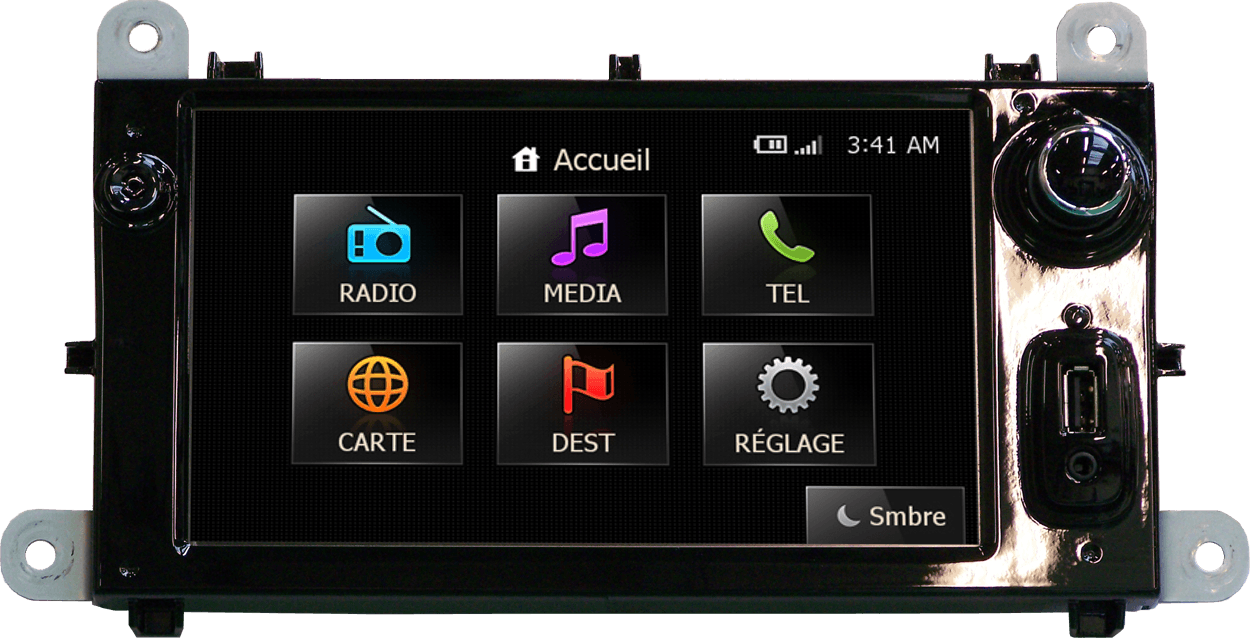
What are the common symptoms of a MediaNav malfunction?
Some malfunctions can be noticed quickly when starting the vehicle.
The MediaNav no longer turns on
The screen remains black and no information is displayed. In this case, it is important to check whether the system still produces sound, whether the backlight is working, or if the device remains completely inactive.
A black screen does not necessarily mean that the entire head unit must be replaced. A diagnosis is recommended before making any decision.
The system remains stuck on the logo
The MediaNav can turn on, display the startup logo, then remain frozen. In some cases, it restarts automatically without being able to function normally.
This symptom may be linked to a software or electronic fault. It is not recommended to perform multiple resets or install unsuitable files without prior diagnosis.
The MediaNav keeps restarting in a loop
The system starts, displays the logo, then shuts down and continuously restarts. It may also restart on its own randomly during use.
During the check, it is useful to note:
- • The frequency of restarts;
- • The conditions under which the fault occurs;
- • Any error messages;
- • The exact reference of the unit.
The touchscreen no longer works properly
The touchscreen may become completely inactive or only respond on certain areas of the screen. The display may also be degraded or the screen may be cracked.
Before planning a full replacement, it is preferable to check whether the fault only concerns the touchscreen interface or another system component.
The radio, sound, or connectivity shows a fault
Other symptoms may appear:
- Poor radio reception;
- No sound;
- Intermittent audio fault;
- Microphone problem;
- USB port not working;
- Unstable Bluetooth;
- Message d’erreur récurrent ;
- Abnormal power consumption.
Mise à jour ou réparation : comment faire la différence ?
Not all anomalies require immediate repair.Not all anomalies require immediate repair. An initial check helps guide the diagnosis correctly.
- Outdated maps
Check: availability of an official update.
Possible solution: map update. - Inaccurate GPS
Check: GPS reception outdoors.
Possible solution: further diagnosis. - Logo stuck or frequent restarts
Check: frequency of the issue and displayed messages.
Possible solution: workshop diagnosis. - Black screen or unresponsive touchscreen
Check: operation of the sound, backlight, and different touch zones.
Possible solution: targeted repair. - Error message
Check: exact text of the displayed message.
Possible solution: workshop diagnosis.
The Reparlab by Faurecia Clarion offering
Benefit from a fast intervention:
- Online request: The garage registers the file on our Reparlab platform.
- Express collection: A carrier picks up the part the same day (for any order before 12:00 PM).
- Technical expertise: Receipt of the module in our specialized workshops in the Grand Est.
- Refurbishment: Repair, precise calibration, and final product control.
- Livraison : Retour de la pièce directement au garage, prêt à être remonté.
Have questions? Find your answers here!
Why is my MediaNav stuck on the logo?
A freeze on the logo may be linked to a software or electronic issue. If the system no longer completes startup or keeps restarting continuously, a workshop diagnosis is recommended.
Why does my MediaNav keep restarting in a loop?
The system may display the logo, shut down, then restart without being able to function properly. It is advisable to note the unit reference and avoid uncontrolled handling.
Is an update sufficient when the map is outdated?
When the system works properly and only the maps are outdated, start by checking the availability of an official update.
What should I do when the touchscreen no longer responds?
Test several areas of the screen and check whether it is cracked. A diagnosis helps determine whether a targeted repair is possible.