
NAVI 900 screen does not turn on or shows a black screen: signs of a fault and when to send it for repair.
The NAVI900 IntelliLink is an infotainment system used in several Opel/Vauxhall models. Depending on the vehicle configuration, it provides access to navigation, multimedia settings, the phone, vehicle settings, and certain connected functions. Opel/Vauxhall manuals confirm that these systems can be controlled via the touchscreen, physical controls, steering wheel controls, or voice recognition, depending on the vehicle’s equipment.
The DISPLAY NAVI900 screen is therefore not just a passive display. It plays a central role in the in-car user experience. When it turns black, becomes unstable, or stops responding to touch, daily use of the vehicle quickly becomes complicated, even if some functions, such as audio, may sometimes continue to work.
This type of screen is mainly found on:
- Opel / Vauxhall Astra
- Opel / Vauxhall Insignia
Among the common manufacturer references associated with the DISPLAY NAVI900 are: 6025259, 26683329, 39004448, 39018792, 39022448, 39042448, 39042448, 39042488, 39072448, 39084504, 39157263, 39240448, 306804467, 368046467, 1640635280, 3901879236, 9368100047, 39042448, 01-213460, 01-213882, 01-215704, 01-217570, 1652JNP, 1ARB873, 1BWJ893, 1-BWJ-893, 1EUH372, 1VHU282, 1XUZ533, 2ALX563, 2DAD816, 2FEL973, 39042448A, 39042448R, FH690ZG, G32700046, G32700827, YR0025448.
This list may vary depending on the vehicle model, year, version, and equipment supplier. Reparlab by Faurecia Clarion also lists several compatible references on its repair pages dedicated to the DISPLAY NAVI900.
The Most Common DISPLAY NAVI900 Faults
DISPLAY NAVI900 faults can appear in several ways. Reparlab identifies three main categories of faults:
Aucun fonctionnement, affichage incorrect et écran tactile qui ne fonctionne pas correctement.
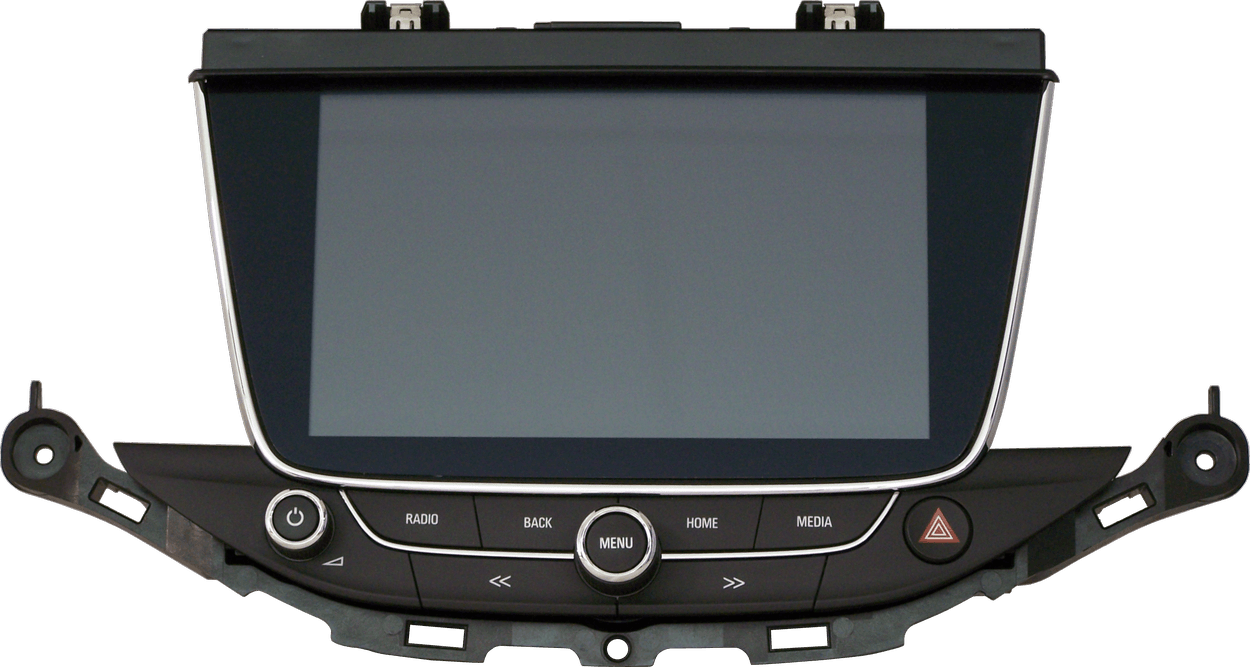
Black screen or complete failure to turn on.
The first common symptom is a completely black screen. In some cases, the audio system may still work, but the display remains unusable. The driver can no longer properly access navigation, menus, or settings displayed on the screen.
This type of fault may be linked to an internal power supply issue, backlighting problem, electronic board failure, or internal connection issue. For the garage, it is important to check the external elements first before concluding that the screen is faulty.
Touchscreen malfunction or “ghost touch”.
Another common fault concerns the touchscreen. The screen may stop responding to commands, react randomly, or trigger actions without any input from the driver.The screen may stop responding to commands, react randomly, or trigger actions without any input from the driver.
This phenomenon is often referred to as ghost touch.
In this case, the display may still appear readable, but use becomes unpredictable. The driver may have difficulty selecting a destination, changing a setting, or simply navigating through the menus. For safety reasons, it is preferable not to operate the system while driving if the screen reacts unpredictably.
Altered display, lines, or dark areas.
The third type of symptom concerns display quality. The screen may show vertical lines, dark areas, partial display, abnormal colors, flickering, or an image that disappears intermittently.
These faults may indicate panel wear, an image processing issue, or an internal electronic failure. In all cases, it is recommended to avoid uncontrolled disassembly, as the ribbon cables, connectors, and internal components are sensitive.
External checks to perform before sending.
- Vehicle power supply: Check that the battery and fuses linked to the multimedia system are in good condition.
- External connections: Visually check the connectors accessible without opening the screen.
- Exact symptom: Identify whether the fault concerns the display, the touchscreen, or a complete lack of operation.
- Vehicle history: Check whether any previous work has been carried out on the multimedia system.
Why repair instead of replace?
The complete replacement of a multimedia screen can represent a significant cost for the end customer, especially when it is an original part. Repair makes it possible to keep the existing equipment while addressing the identified fault.
For the Opel/Vauxhall DISPLAY NAVI900, Reparlab offers a repair solution designed for automotive professionals. The service is handled through the professional portal, with a fixed-price process.
The Reparlab solution includes:
- An average turnaround time of 2 to 5 days;
- Repairs carried out in France;
- A 2-year warranty;
- A clear fixed-price process for professionals;
- Expertise in automotive electronics;
- ISO 14001 and IATF 16949 certifications.
Have questions? Find your answers here!
What are the symptoms of a faulty DISPLAY NAVI900?
The most common symptoms are a black screen, incorrect display, or a touchscreen that no longer responds properly. These faults are clearly listed by Reparlab for the DISPLAY NAVI900.
Which vehicles are compatible with the DISPLAY NAVI900?
The DISPLAY NAVI900 is associated with certain Opel/Vauxhall Astra and Opel/Vauxhall Insignia models, depending on the vehicle version and part reference. Reparlab offers dedicated pages for Astra and Insignia.
Which DISPLAY NAVI900 references are concerned?
6025259,26683329,39004448,39018792,39022448,39042448,39042448,39042488,39072448,39084504,39157263,39240448,306804467,368046467,1640635280,3901879236,9368100047, 39042448,01-213460,01-213882,01-215704,01-217570,1652JNP,1ARB873,1BWJ893,1-BWJ-893,1EUH372,1VHU282,1XUZ533,2ALX563,2DAD816,2FEL973,39042448A,39042448R,FH690ZG,G32700046,G32700827,YR0025448
Can a DISPLAY NAVI900 screen be repaired instead of replaced?
Yes. Reparlab by Faurecia Clarion offers a DISPLAY NAVI900 repair solution to avoid complete part replacement when the fault is repairable. It is a solution suited to garages that want to offer a more economical and sustainable alternative.